
Andrew Ng's 2026 AI Prompting Course – Module 3 Complete Notes: Let AI Generate Images, Build Apps, and Analyze Data
Module 1 taught you how to "find information." Module 2 taught you how to "let AI think for you." Module 3 teaches you to let AI actually make things for you — generating images, building apps, and running data analysis.
This is the most underestimated part of the entire series. Tasks that once required specialized skills — designer, engineer, data analyst — can now be accomplished with a single well-crafted prompt.
Each lesson is organized into three parts: screenshot + one-line takeaway + one template.
Day 1 · Multimodal Cost Awareness: Know When to Use Which Output Type
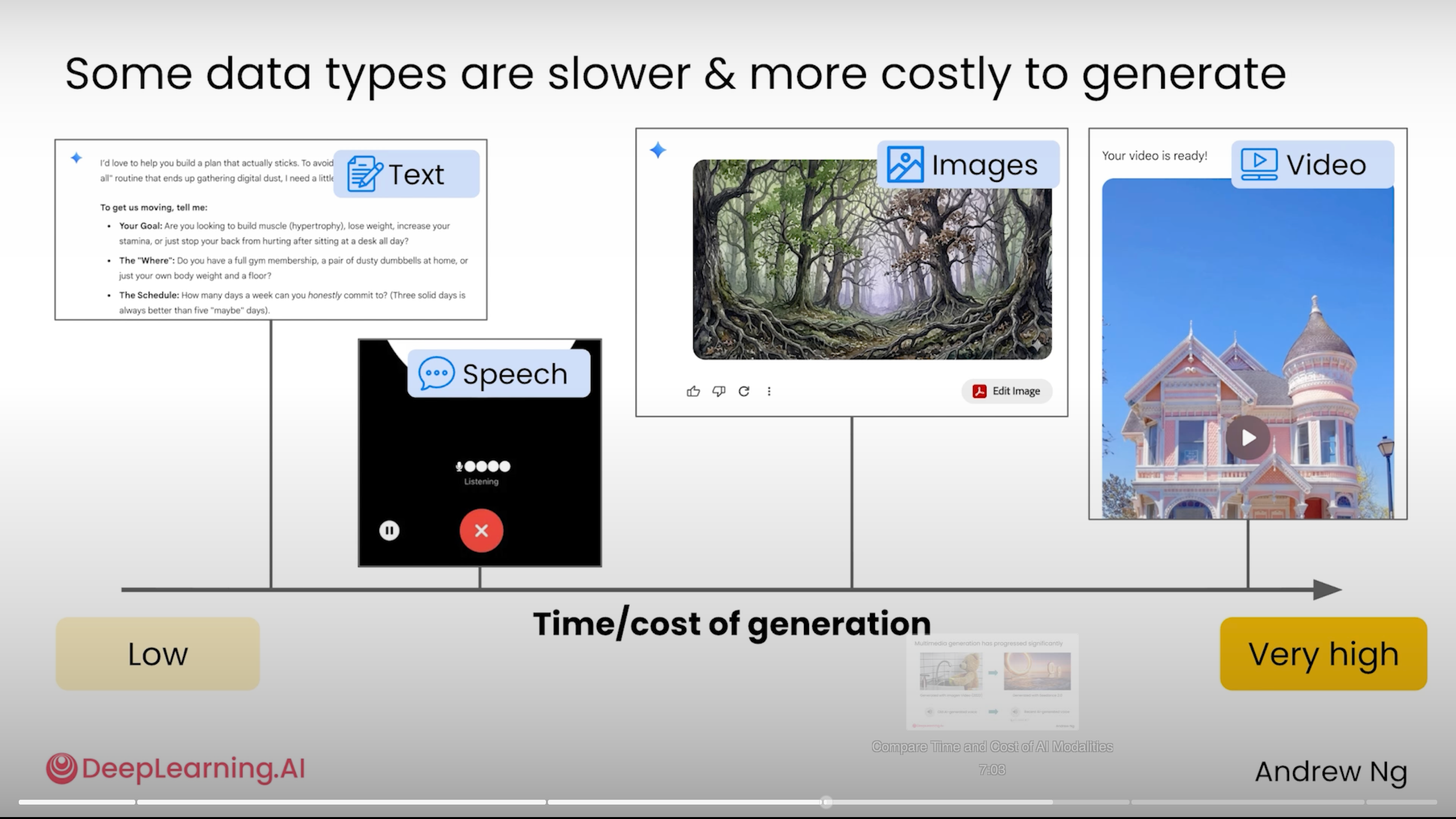
💡 One-line takeaway: Text is nearly free and takes seconds; voice costs a few cents and takes tens of seconds; images cost tens of cents and take tens of seconds; video costs dollars and takes minutes. The key insight: if text can communicate it clearly, don't ask for an image. If an image can do the job, don't ask for a video.
📋 Template · Multimodal Cost Awareness Check
I want AI to help me with: [task]

Before answering, evaluate three things:
1) Can this task be solved with plain text?
   Yes → Use text. Saves 90% of time and cost.
   No → Move to 2)
2) Can a static image solve it?
   Yes → Generate an image. (Cost stays manageable.)
   No → Move to 3)
3) Does it truly require video?
   Yes → First explain it with images, then produce only 1 video at the end.
        (Videos can't be iterated cheaply.)

Recommend an approach and estimate the time and cost.
Day 2 · Image Understanding: AI Reads Text in Images Well, but Sees Visuals Roughly
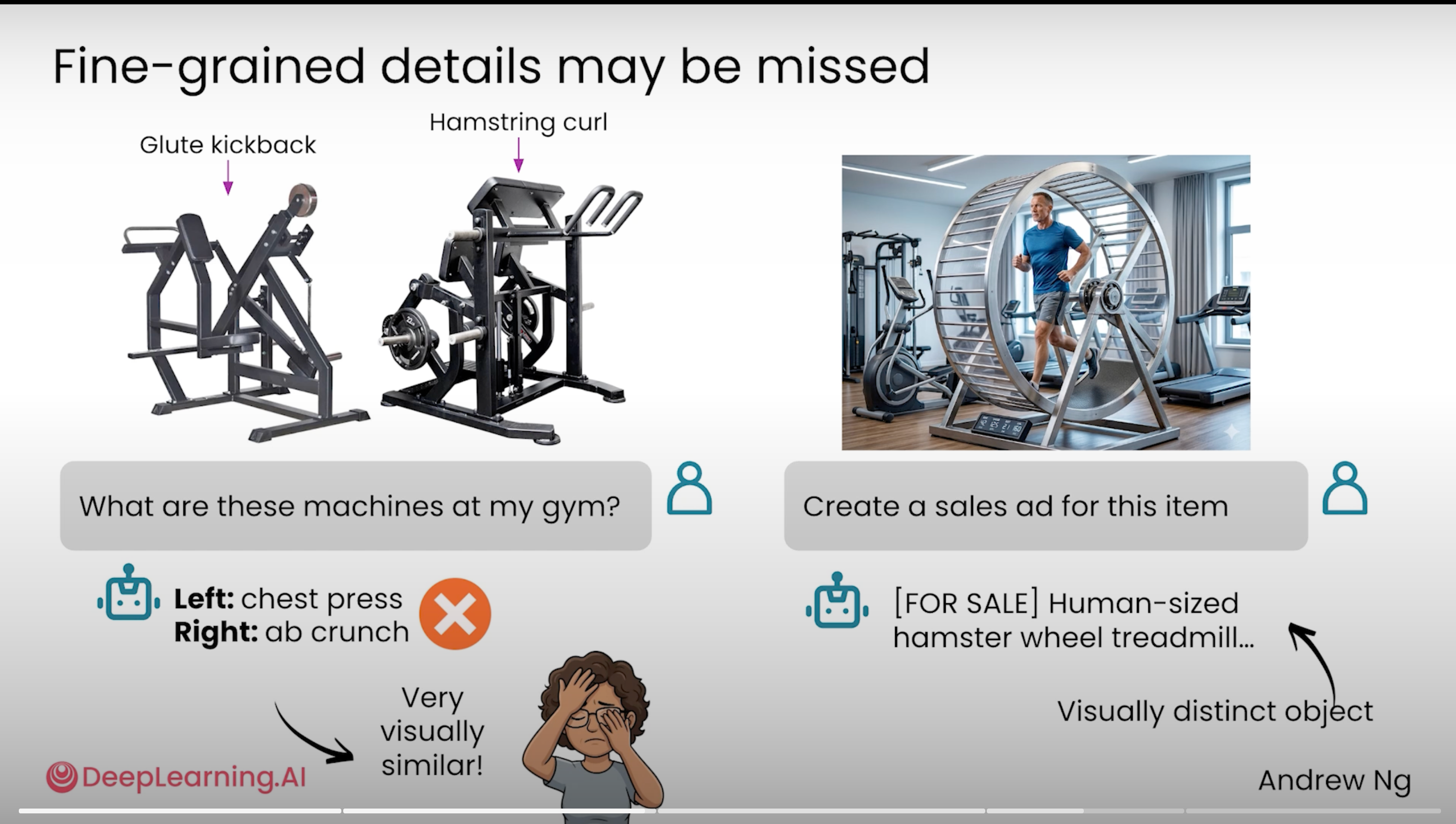
💡 One-line takeaway: AI sees images at a "rough glance" level — it frequently misidentifies visually similar equipment (kickback vs. hamstring curl), but it's highly accurate at recognizing distinctive objects (a human-sized hamster wheel) and reading text inside images, even handwritten text.
📋 Template · Extracting Information from an Image
[Upload image]

Please extract information in the following order, completing each step independently:

Step 1 · Tell me what you see (rough description)
- What is the main subject?
- Your confidence level in identifying it (high / medium / low)

Step 2 · Extract all text (if present)
- Transcribe every visible piece of text in full
- Mark uncertain characters as [?]

Step 3 · Structured data (as needed)
- Tables / lists / numbers / dates → format as markdown

Step 4 · My specific request: [your need]
(e.g., split my bill / organize into a Notion table / translate to English)
Day 3 · Image Generation: You Need "Visual Language" to Get Good Results
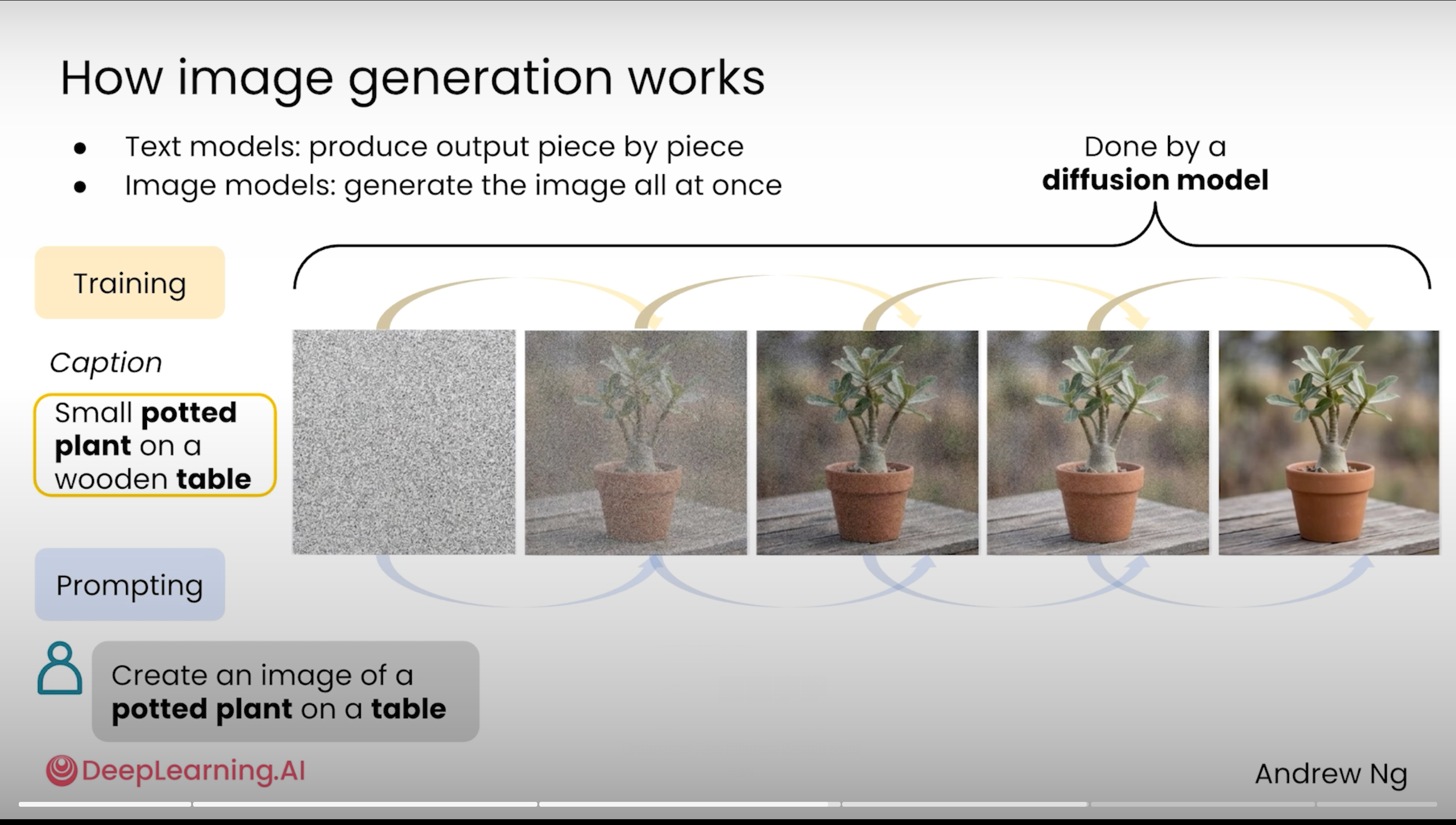
💡 One-line takeaway: AI image generation is fundamentally "reverse denoising from noise" — the more precise your prompt, the more accurately it denoises toward your target. Art vocabulary (cinematic / watercolor / cyberpunk / anime) is 10× more useful than vague adjectives (beautiful / cool).
📋 Template · Let AI Write the Image Prompt for You First
I want to generate an image: [one-sentence description of what you want]

Don't generate the image yet. Help me write a professional image generation prompt
that includes the following elements:

1) Setting: time, location, atmosphere
2) Subject: who, doing what, in what pose
3) Style keywords — choose 2–3 from this list or add your own:
   cinematic / watercolor / oil painting / cyberpunk / anime
   minimalist / editorial / 3D render / pencil sketch / vintage
4) Lighting: natural / golden hour / dramatic / soft
5) Composition: close-up / wide angle / overhead / symmetric

Output 3 prompt options in different styles. I'll pick one, then ask you to generate.
Day 4 · Vibe Coding: One Prompt Can Build a Working App
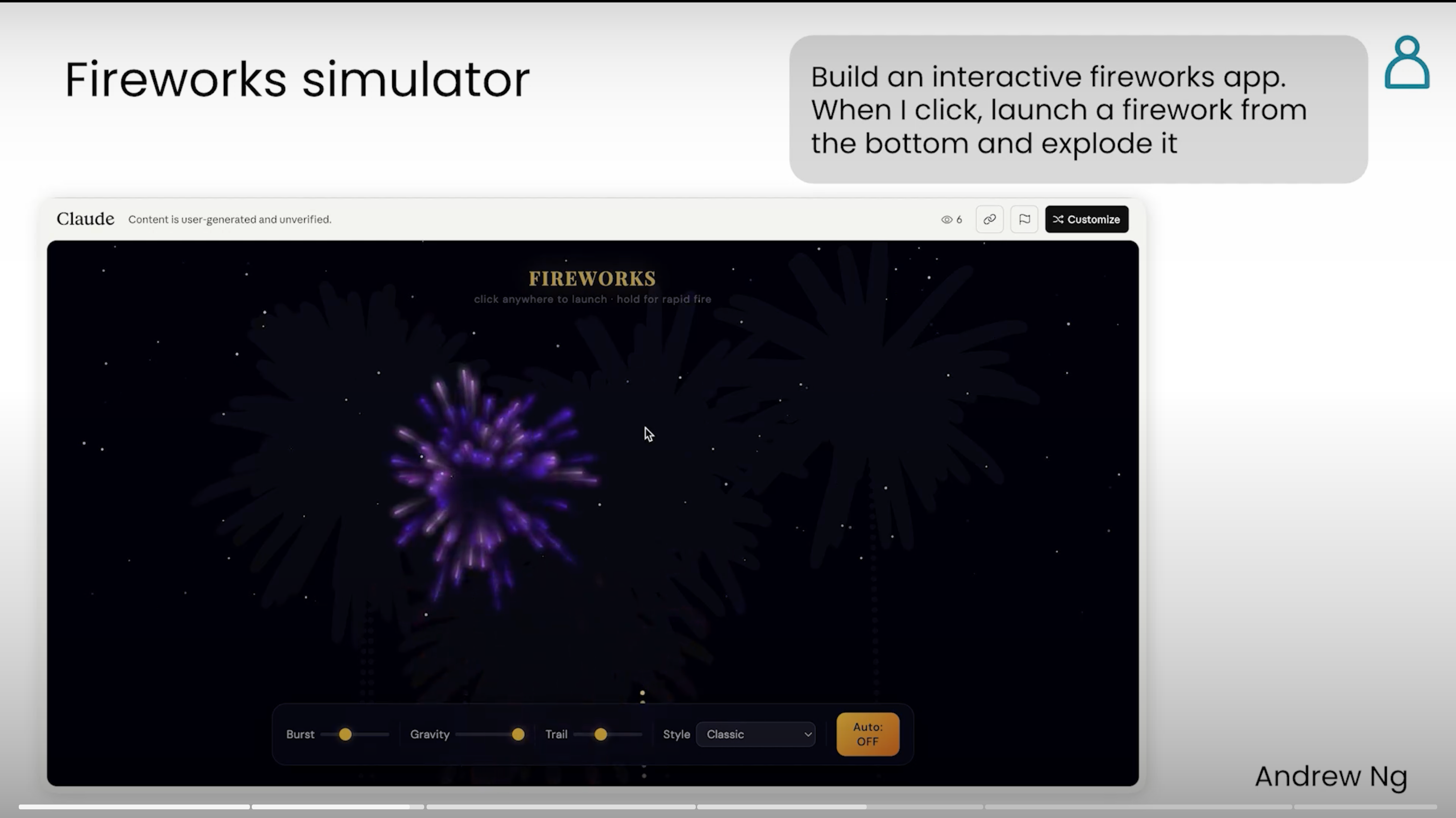
💡 One-line takeaway: Using a Goal + Input + Output prompt structure with Claude or ChatGPT, you can generate a mini app that runs directly in the browser. Simple things are easy (French flashcards, timers, expense splitters). Complex things are still hard (multiplayer features, real-time AI feedback).
📋 Template · Mini App Builder (GIO Framework)
Please build a mini app that runs in a browser.

[Goal] The core purpose of this app
[One sentence — e.g., Help me practice 100 common French vocabulary words]

[Input] What the user can do or enter
- [Input item 1 — e.g., Click a "Start" button]
- [Input item 2 — e.g., Type an answer using the keyboard]

[Output] What feedback the app gives the user
- [Output item 1 — e.g., Display a French word, then reveal the English translation after 3 seconds]
- [Output item 2 — e.g., Show green ✓ for correct, red ✗ + correct answer for wrong]

[Constraints]
- Single-file HTML (CSS + JS included), openable by double-clicking
- No backend required, no npm install
- Must work on mobile

First list 3 feature specs for my approval, then write the code.
Day 5 · Data Analysis: AI Writes Code to Run Your Data
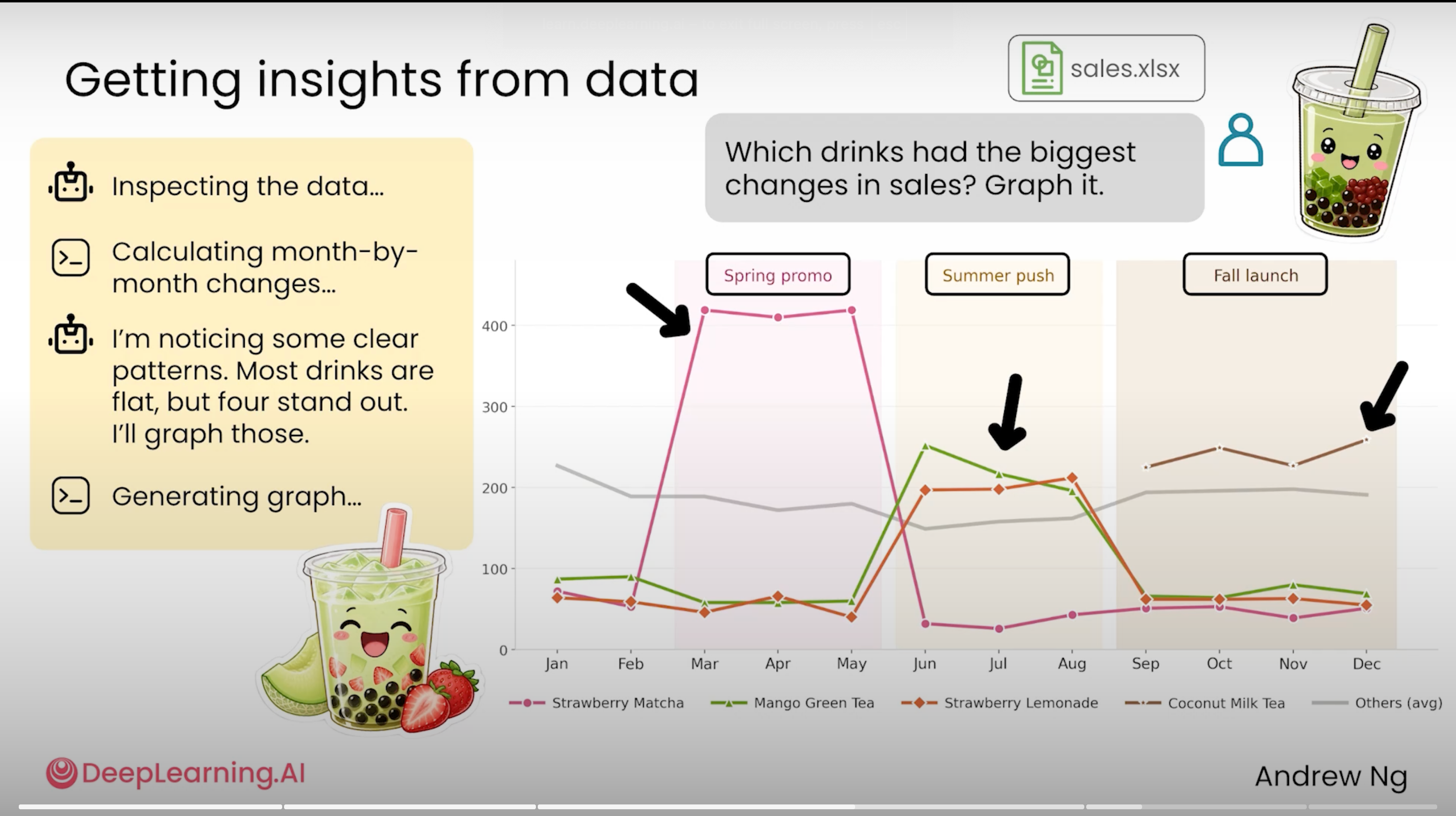
💡 One-line takeaway: Upload a CSV, Excel file, or PDF report and AI will write Python code on its own to run analysis, generate charts, and surface patterns. In the bubble tea example, it even automatically skipped stable products and focused on 4 seasonally volatile bestsellers. But all numbers must be verified by a human — hallucinations still happen.
📋 Template · Data Analysis Driver
[Upload your data file]

Please analyze using the following process. Write and run code for each step:

Step 1 · Describe the data structure
- Total number of rows and columns
- Key fields and their data types
- Time range covered
- Any outliers or missing values

Step 2 · My core question: [what you want to know]
(e.g., Which products are growing fastest? How large is the seasonal gap?)

Step 3 · Analysis requirements
- Use code to calculate everything (no guessing from impression)
- Show code + result side by side for key numbers so I can verify
- Skip flat, uninteresting data automatically — focus on anomalies and trends
- Produce 1–2 key charts (matplotlib, clean color palette)

Step 4 · Conclusions and action recommendations
- 3 most important insights I should pay attention to
- Each paired with 1 concrete action I can take right now
Day 6 · Final Project: Build Something Real Using Everything You've Learned
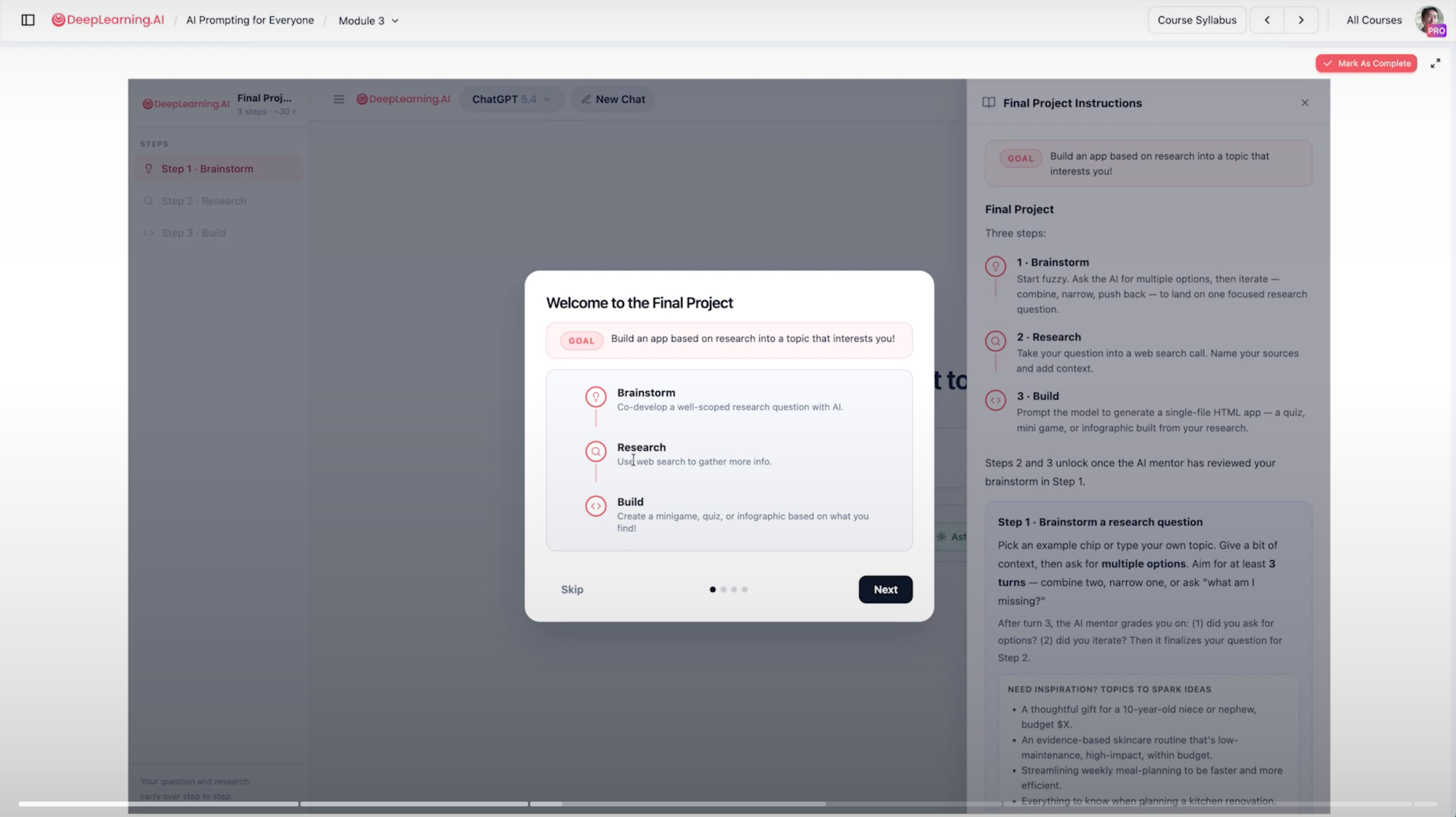
💡 One-line takeaway: Andrew Ng's official lab final project chains together the full skill set from Modules 1–3: brainstorm questions (M2 ideation) → deep research (M1 sourcing) → generate a mini app (M3 vibe coding). Running through it once lets you feel what it's really like to have AI as a full-stack collaborator.
📋 Template · Three-Step End-to-End Project
I want to run a real research + working mini app project.

[Step 1 · Brainstorm research questions]
My area of interest: [career / health / investing / learning / hobbies...]
My specific situation: [age / current status / resources / preferences]

Brainstorm 5 specific research questions, each under 30 words.
After I give feedback, iterate 2 more rounds.

[Step 2 · Deep research]
Once the research question is confirmed:
- Enter deep research mode
- Draw from at least 20 independent sources
- Prioritize official, academic, and primary data
- Output a structured report presenting both supporting and opposing perspectives

[Step 3 · Generate a mini app]
Based on the research report, build one of the following (choose one):
A. A 5-question multiple-choice self-assessment quiz
B. A one-page infographic summarizing key findings
C. An interactive decision-making mini game

Requirement: single-file HTML with a shareable URL.
Six Lessons in One Sentence
AI can already do far more than chat. It can generate images, build apps, and run data analysis. Every task has a lowest-cost path — the key is knowing how to ask for it.
🎬 All 21 Lessons Complete — That's a Wrap
All 21 lessons are done. Here's the one-sentence summary for each module:
- M1 · Find Information: Give AI a neutral framework + strict source constraints + use Deep Research when needed
- M2 · Thinking Partner: Provide full context + use a rubric to anchor evaluation + use ultrathink to unlock deeper reasoning
- M3 · Make Things: Choose the right modality to cut costs + use visual language for image generation + use the GIO framework to build apps
A PDF with all 21 lessons and 30+ prompt templates is available to subscribers 👉 Free Handbook.
→ Previous: Module 2 · Thinking Partner → First post: Module 1 · Finding Information
Want to Keep Learning How to Code with AI?
Andrew Ng's own recommended next step: Build with Andrew — a course specifically designed for non-engineers who want to build production-ready applications with AI. I'll be working through that course and publishing notes here as well.
FAQ
Subscribe to Newsletter, get the full playbook free
Subscribe to receive the complete "AIP Overseas Social Media Playbook" plus weekly AI curated content
Related Posts
Jason Zhu
Ex-AI Engineer | AI Blogger